***
title: Event subscriptions
icon: cloud-arrow-down
intro: Add event notifications to your integration.
---------------------
For clean Markdown of any page, append .md to the page URL. For a complete documentation index, see https://docs.payroc.com/full-stack-guides/board-merchants/llms.txt. For full documentation content, see https://docs.payroc.com/full-stack-guides/board-merchants/llms-full.txt.
Event subscriptions are a feature of our API that you can subscribe to so that we notify you about changes to an account, for example, when we change the status of a processing account.
**Note:** For a list of the events that you can subscribe to, go to [Events list](/knowledge/events/events-list).
## How it works
The following diagram shows how to subscribe to an event and how to handle an event.
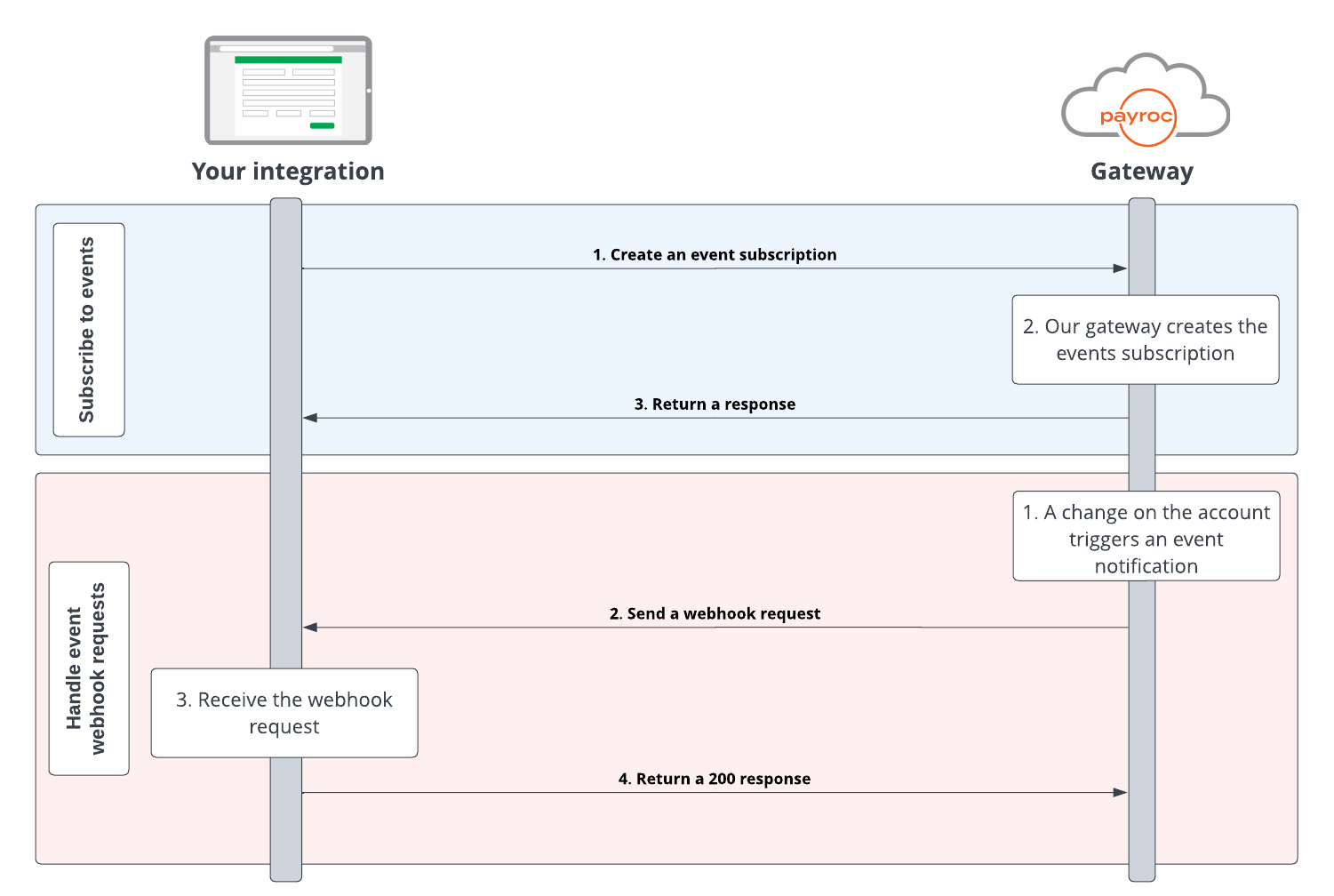
### Subscribe to events
1. Create an event subscription and send it to our gateway.
2. Our gateway creates the event subscription.
3. Our gateway sends you a response to confirm that we have created the subscription.
### Handle event notifications
1. We make a change to an account and trigger an event notification.
2. Our gateway sends a webhook to your endpoint.
3. Your server returns a 200 response to confirm that you have received the webhook.
## Your integration journey
To add event notifications to your integration, complete the following steps:
1. Create an event subscription with our API.
2. Handle the webhook.
## Guides
Add event notifications to your integration.