For AI agents: a documentation index is available at the root level at /llms.txt and /llms-full.txt. Append /llms.txt to any URL for a page-level index, or .md for the markdown version of any page.
Get startedSolutionsEssentials GuidesFull Stack GuidesKnowledgeTestAPI
    • Solutions
  • Essentials
    • In-person payments
    • Online payments
  • Full Stack
      • In-person payments
      • Online payments
        • Payroc API
        • Payment Links
        • Hosted Fields
        • Hosted Payment Page
LogoLogo
On this page
  • Key capabilities
  • How to use Payment Links
  • API Integration
  • Self-Care Portal
  • You might also be interested in…
Full StackTake paymentsOnline payments

Payment Links

|View as Markdown
Was this page helpful?
Previous

Payroc API for online payments

Next

Hosted Fields

Our Payment Links solution allows a merchant to create a shareable link that directs a customer to a secure hosted payment page. The customer selects the link, completes the payment, and the merchant receives the funds — no website or checkout integration needed.

Payment links are ideal for a wide range of use cases, including invoices, donations, one-off purchases, bill payments, and any scenario where businesses need to request and receive payments quickly and reliably.
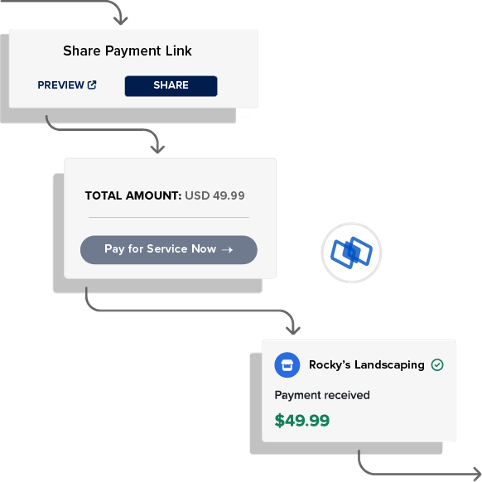
Payment Links solution image

Key capabilities

On-demand link creation

  • Generate payment links on demand.
  • Share links through the merchant’s preferred channel.
  • Use our API or Self-Care Portal interchangeably.

Flexible configuration

  • Create one-time links or reusable links.
  • Choose between a sale transaction or pre-authorization transaction.
  • Set up a fixed amount or allow the customer to enter the amount.
  • Accept card payments, bank transfer, or both.

Secure payment processing

  • Redirect customers to a PCI-compliant payment page to make payments.
  • Limit the merchant’s PCI scope as no merchant website is needed.

Tracking and reporting

  • View payment statuses to check if the payment is completed or failed.
  • Access reporting for reconciliation and activity monitoring.
  • Manage links and follow-on actions from either the API or Self-Care Portal.

How to use Payment Links

There are two ways to use Payment Links:

  • Integrate with our API.
  • Use our Self-Care Portal.

Both options provide the same capabilities to create, share, and manage payment links. They also use the same payment link data, so you can create a payment link with one option, and then share the payment link with the other option.

API Integration

Integrate with our low-code Payment Links endpoints to create payment links and share them. For detailed integration steps, go to our integration guide for Payment Links.

To perform follow-on actions, such as refunds, integrate with our other Payments methods. For more information about our Payroc API and other follow-on actions, go to our API Explorer.

Self-Care Portal

Our Payment Links solution can also be used through our Self-Care Portal. This no-code option allows merchants to create and share payment links without any development work. For more information about Payment Links, go to our Support Hub.

You might also be interested in…

Payroc API

Offer a full payment acceptance solution with broad capabilities.

Hosted Fields

Add secure payment fields directly into a merchant’s checkout page.

Hosted Payment Page

Add a secure payment page to a merchant’s website.